Options


Options: Sets the options to be applied on the detected Maxima.
Exclude on Edges: If checked, Maxima touching the edge of the image (or selection) will be ignored. Default setting is unchecked.
Shape descriptors: If checked, Shape measurements including the angularity, the area, the aspect ratio, the circularity, the curvature, the length, the roundness, the sinuosity, the solidity and the width are recorded in the Results table (see Particle Properties for more details). Uses the heading SHAPE.
Segmentation +: If checked, segments Maxima in the image using a watershed algorithm (see ImageJ Local Maxima Detection for more details). This option is enabled when the mode of detection is either ‘Foci’, ‘Bacteria’ or ‘Filament’.
Thickness: Selects the thickness in pixels of the line used to segment Maxima boundaries. Default setting is 0.1.
Intensity +: (See Bacteria Intensity for More Details).
Type □: (See Bacteria Type for More Details).
Gaussian Fit +: If checked, positions of local Maxima are estimated at the sub-pixel resolution using a 2D Gaussian fitting algorithm.
Method: Allows any of the different algorithms used to perform 2D Gaussian fitting to be selected. Two methods are available: NelderMead and Levenberg Marquard.
Iteration: Selects the maximum number of iterations for the Nelder Mead optimization algorithm.
Threshold: Selects the minimal peak amplitude for the Gaussian fit to be accepted. Default value is ‘max’.
Radius [p]: Selects the radius of the circular area use to perform 2D Gaussian fitting. Value is expressed in pixels. Default setting is 2.
Filter +: If checked, local maxima detection is performed on a filtered version of the active image. Note that the filter is applied on a transient version of the image and will not permanently change the original image.
Method: Allows none or any of the different image filters to be selected. Seven filters are available: mean, median, min, max, variance, smooth and sharpen (see ImageJ Filters for more details).
Size: Selects the size of the kernel used to filter Image. Value is expressed in pixels.
Contact +: (See Bacteria Contact for More Details).
Profile □: (See Bacteria Profile for More Details).
Distance +: (See Bacteria Distance for More Details).
Co-localization +: If checked, the number of particles from the specified type that co-localize with each particles of the active type is measured. Uses the heading COLOCALIZE in the Results table. This option is enabled when more than one category of Maxima are detected.
Tolerance: Particles with a distance between their respective centers lower than the specified value are considered as co-localizing. The tolerance is expressed in pixels or in calibrated units. Values may range between 0 and ‘max’. Default setting is 0.
Binary +: If checked, uses an existing binary mask (instead of local maxima detection) to detect particle contours and particle centers. The remaining steps of the analysis are performed on the specified channel (if different from Binary).
Overlapping +: If checked, removes all the particles that are overlapping and keeps only the particles with the brightest signal intensity or the highest value of the specified property. This option is enabled when the mode of detection is either ‘Foci’, ‘Bacteria’ or ‘filament’.
Property: Selects the property to be used. Leave the field blank to select the signal intensity. Default setting is empty.
Filament Correction +: If checked, the position of each point along the filament is adjusted smoothly using a local maxima detection algorithm (see Figure 1). For each point, pixel values are measured along the orthogonal axis. This option is enabled when the mode of detection is ‘Filament’.
Width: Selects the width in pixels or in calibrated units of the orthogonal line used to measure pixels intensities. Sets 0 to use the average width of the particle. Default setting is 0.
Threshold: Defines the magnitude threshold used to evaluate local maxima. Maxima are accepted only if the local maxima are significantly larger than the data around it. Note that the lower the value, the more maxima are detected. Values range from 0 to max.
Smooth: The size of the moving window used by the linear smoother. Set size to 0 to deactivate this option. Default setting is 1.
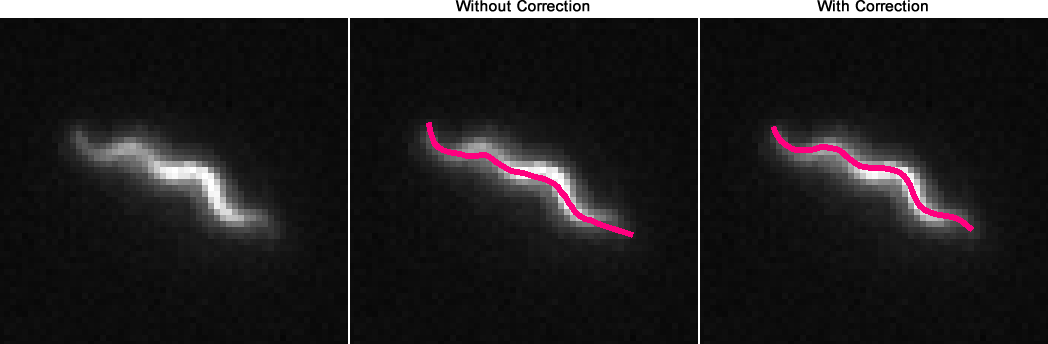
Figure 10: The Filament Correction Option.
Created with the Personal Edition of HelpNDoc: Easily create Web Help sites