Options


Sets the options to be applied on the detected particles.
Exclude on Edges: If checked, particles touching the edge of the image (or selection) will be ignored. Default setting is checked.
Shape descriptors: If checked, Shape measurements including the angularity, area, aspect ratio, circularity, curvature, length, roundness, sinuosity, solidity and width are recorded in the Results table (see Particle Properties for more details). Uses the heading SHAPE in Results table. Default setting is unchecked.
Segmentation □: If checked, the particles rejected during the evaluation process are subjected to a segmentation process. Press □ to open the Segmentation Options dialog box. using the default thresholding method. All resulting binary mask are analyzed and the one that minimizes the number of rejected particles and maximizes the number of accepted particles is retained for further analysis.
Intensity +: If checked, Signal Intensity measurements are recorded in the Results table (see Particle Properties for more details). Uses the heading INTENSITY in the Results table.
Resolution: The resolution in pixels (1/scale factor) used to resample the selected image before measuring the gray values of all the pixels inside the particle contour (see Figure 1). Note that a value of 1 will keep the actual resolution of the selected image. Default setting is 1.
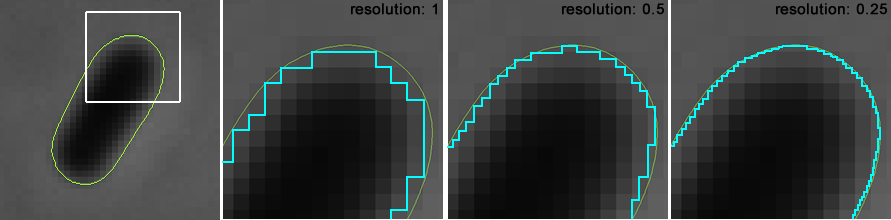
Figure 4: The signal resolution.
Signal: Defines if the average gray value measured within the particle boundary is significantly different (or not) from the background signal. Becomes true when the unsigned sigma distance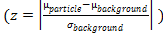 is higher than the value specified is this field. The background signal is measured with the reciprocal binary mask used to detect the particles. Default setting is 2.
Correlation: If checked, the Pearson product-moment correlation coefficient is measured between the respective channels for the gray values within the particle boundary. The Pearson coefficient varies between +1 and −1 inclusive, where 1 is total positive correlation, 0 is no correlation, and −1 is total negative correlation.
Raw Pixel: If checked, pixel values measured within the particle boundary are recorded in the Results table (see Particle Properties for more details). Default setting is unchecked.
Type □: If checked, the type of every particle is determined using their respective properties and recorded in the Results table using the heading TYPE (see Particle Properties for more details). Each type consists of specific criteria designed to evaluate particles properties and/or morphologies. Press □ to open the Type Options dialog box.
Septum □: If checked, septa are detected along the medial axis of the particle. Uses the heading SEPTUM in the Results table. Press □ to open the Septum Options dialog box.
Branching: If checked, allows more than one medial axis to be detected inside a particle (see Figure 2). Default setting is unchecked.
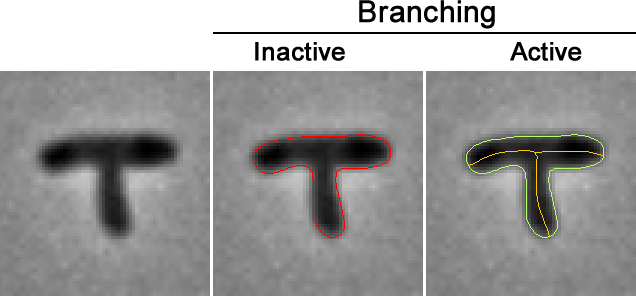
Figure 5: The Branching Option.
Orientation +: If checked, the direction of the medial axis (from pole1 to pole2) and/or the direction of the transverse axis (from side1 to side2) are determined using the specified properties (see Particle Properties for more details). Note that the sub-cellular location and localization of child particles (see Association for more details) is determined using the direction of both the medial and the transverse axis.
Pole: The longitudinal half of the particle minimizing the specified property is considered as the first half.
Side: The lateral half of the particle minimizing the specified property is considered as the first side.
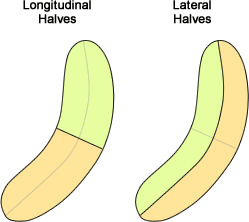
Figure 6: Orientation.
Contact +: If checked, the number of surrounding particles in contact with each particle is measured. Uses the heading CONTACT in the Results table.
Tolerance: Particles with a shortest distance between their respective boundaries lower than the specified are considered as being in contact. The tolerance is expressed in pixels or in calibrated units. Values may range between 0 and ‘max’. Default setting is 0.
Distances: If checked, the values of the shortest distance between particles in contact are recorded in the Results table (see Particle Properties for more details).
Profile □: If checked, pixel values measured along the specified axis and/or straighten images of the particle along the specified axis are recorded in the Results table. Press □ to open the Profile Options dialog box.
Distance +: If checked, the distances between particles and/or associated Maxima are measured.
Centroids: If checked, the distances between each particle’s centroid are measured and recorded in the Results table (see Particle Properties for more details). Uses the heading DISTANCE in Results table. Only the surrounding particles within the specified tolerance are included.
Tolerance: Selects the maximum distance between particles to be included in the analysis. The tolerance is expressed in pixels or in calibrated units. Values may range between 0 and ‘max’. Default setting is 0.
Maxima: If checked, the relative distances between each particle’s sub-particles are measured and recorded in the Results table (see Particle Properties for more details).
Width Profile: If checked, the width profiles measured along the medial axis of each particles are recorded in the Results table (see Particle Properties for more details).
Clump: If checked, estimates the number of particles inside rejected particles. The number of particle is estimated by dividing the clump area by the specified area.
Area: The hypothetical area in square pixels or in calibrated square units of a single particle inside a clump. Values may range between 0 and ‘max’. Default setting is 0.
Created with the Personal Edition of HelpNDoc: Easily create Web Help sites