Contour


Contour: The basic particle contours produced by the ImageJ edge-detection algorithm are refined into sub-pixel resolution contours using a set of subdivision/interpolation algorithms. Crude polygons are first subdivided using a variant of the Catmull–Clark algorithm and then simplified using a Reumann-Witkam algorithm. The Reumann-Witkam algorithm uses the specified Resolution as the rejection criterion. The simplified polygons are then interpolated at the specified Resolution using a spline function and then smoothed using a linear smoother. The smoothed polygons are eventually enlarged or reduced using edge extrusion algorithms. Medial axes are generated from smoothed particle contours using a skeletonization algorithm. Medial axes are then simplified using a Radial Distance algorithm at the specified Medial axis Resolution. Poles are located using the specified mode (see Pole Mode for more details).
Resolution: The space in pixels between two consecutive points of the particle contour. Default setting is 1.
Smooth box size: The size of the moving window used by the linear smoother. Set size to 0 to deactivate this option. Default setting is 2.
Dilate/Erode: The distance in pixels used to dilate or erode the particle contour. Set distance to 0 to deactivate this option. Default setting is 0.
Medial axis resolution: The space in pixels between two consecutive points of the particle medial axis. Default setting is 1.
Pole mode: Allows any of the two different modes of pole detection to be selected. Two modes of detection are available: Default and Equidistant (Figure 1). Default setting is ‘Default’.
Default: Locates pole circumcenters on the medial axis using the average width of the particle. The distance between pole circumcenters and the closest end of the medial axis will be equal (at the specified pole resolution) to half of the average width of the particle.
Equidistant: Locates pole circumcenters on the respective medial axis using the width profile of the particle. Pole circumcenters will be equidistant (at the specified pole resolution) to the closest end of the medial axis and the two closest points of intersection between its orthogonal projection and the particle boundary.
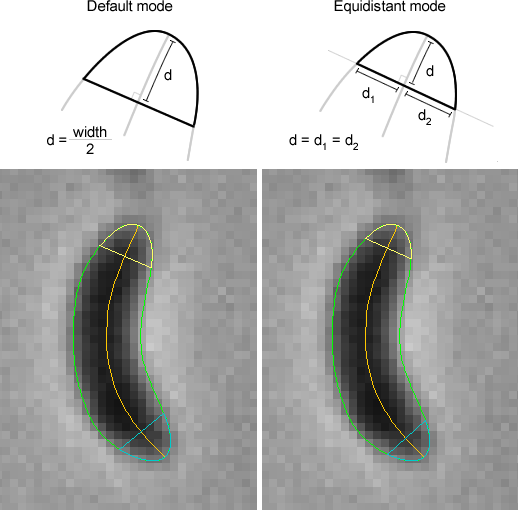
Figure 2: The Pole detection modes.
Pole resolution: The space in pixels between two consecutive points of the particle pole axes.
Fit Shape: When the Rod-Shaped or the Crescent-Shaped interpolation mode are selected, an interpolated contour is generated using the particle medial axis and a function of interpolation. The interpolated width (wp) of the contour as a function of the relative position (p) along the medial axis is determined using the following equation: ( ) with wm, a specified value determined by the Width method and a, referred to as the shape coefficient. When the shape coefficient is equal to 0, the width is constant along the medial axis and equal to the specified value wm. When the shape coefficient tends toward infinity, the shape of the particle gets more tapered. Note that by default, the Rod-Shaped interpolation mode uses shape coefficient equal to 0. When the Crescent-Shaped interpolation mode is selected, a pole eccentricity factor is also used to shape the pole at both ends of the medial axis.
Width method: Select the method used to select or generate the specified value wm. Eight method are available: User-defined, mean, stdev, max, Q3, median, Q1 and min. When the ‘User-defined’ method is selected, the width can be specified manually. When another method is selected, the specified value wm is calculated by using the specified value of the width values measured along the medial axis (mean, stdev, max, Q3, median, Q1 and min). Default setting is ‘mean’.
Width [p]: The user–defined value of the width in pixels. This command is enabled when the ‘User-defined’ method is selected. Default setting is 5.
Shape coefficient: The shape coefficient used to determine the interpolated width along the medial axis. Default setting is 0.9.
Pole eccentricity: The pole eccentricity is the ratio of the distance between the orthogonal and the longitudinal radius of the pole. When the pole eccentricity is equal to 1, the pole gets a circular shape. As the pole eccentricity tends away from 1, the pole gets a more elongated shape. As the pole eccentricity tends toward 0, the pole gets a more squared shape. Default setting is 1.3.
Created with the Personal Edition of HelpNDoc: News and information about help authoring tools and software