Morphologies


This panel contains settings related to the detection of objects using a set of one or more morphologies with the associated parameters. Each morphology consists of specific attributes (size, shape and signal intensity) designed to evaluate objects in the active Image and specific options (mode, resolution, colors) used to generate the final particle (see Figure 1). Each object is tested against all the active morphologies until the specific attributes are met. If not, the object is rejected. When an object meets the attributes of a specific morphology, the options associated with this morphology are used to create the final particle. Press  to add a new morphology or
  to remove the active morphology. Analysis is performed on the existing rectangular selection or on the entire image if no selection is present.
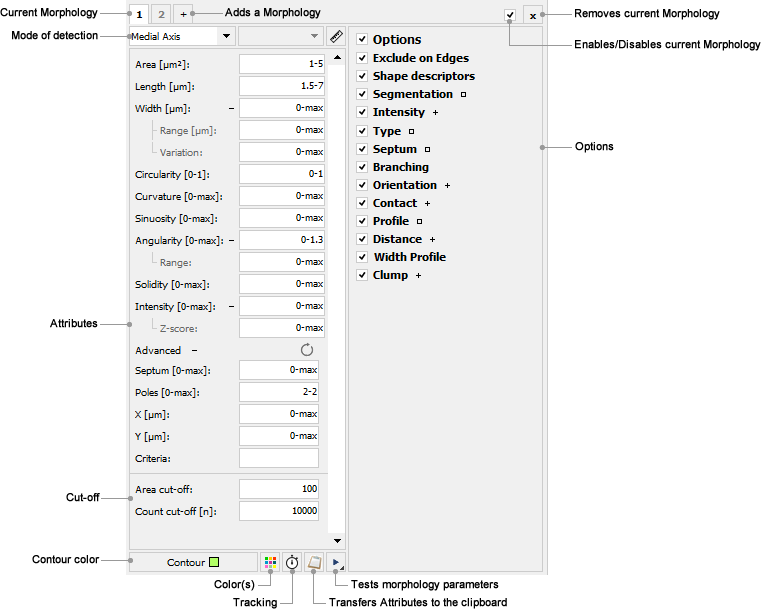
Mode of detection: Allows any of the four different modes of detection to be selected. Four modes of detection are available: Basic, Smoothed, Medial Axis and Fit Shape (see Figure ). Each mode corresponds to different degrees of resolution with which the final particle will be created. Press  to open the Contour Options dialog box.
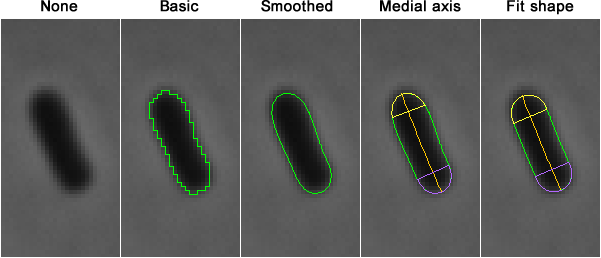
Figure 1: The different modes of detection.
Basic: Particle contours are defined at a pixel-based resolution using an edge-detection algorithm. Note that this mode corresponds to the degree of resolution provided by the ImageJ Particle Analyzer (see ImageJ Documentation). The Area, Circularity, Solidity and Signal intensity will be measured and used as attributes.
Smoothed: Particle contours are defined at a sub-pixel resolution using a set of subdivision/interpolation algorithms (see Contour Options for more details). The Area, Circularity, Solidity and Signal intensity will be measured and used as attributes.
Medial Axis: Medial axes are generated from smoothed particle contours using a skeletonization algorithm (see Contour Options for more details). The Area, Length, Width, Circularity, Curvature, Sinuosity, Angularity, Solidity, Signal intensity, Width range, and Width variation will be measured and used as attributes.
Fit-Shape: An interpolated contour is generated using the particle attributes according to the specified Fit Mode. Four modes are available: Rod-Shaped, Crescent-shaped, Circle and Ellipse.
Rod-Shaped: An interpolated rod-shaped contour is generated using the particle medial axis and the specified value of the width measured along the medial axis (see Contour Options for more details). The Area, Length, Width, Circularity, Curvature, Sinuosity, Angularity, Solidity and Signal intensity will be measured on the interpolated rod-shaped contour when the Width, Width range and Width variation will be measured on the smoothed contour.
Crescent-Shaped: An interpolated crescent-shaped contour is generated using the particle medial axis, the specified value of the width measured along the medial axis, a pole eccentricity factor and a shape factor (see Contour Options for more details). The Area, Length, Width, Circularity, Curvature, Sinuosity, Angularity, Solidity and Signal intensity will be measured on the interpolated rod-shaped contour when the Width, Width range and Width variation will be measured on the smoothed contour.
Circle: An interpolated circular contour is generated using the particle area and centroid. The circle will have the same area and centroid as the original contour.
Ellipse: An interpolated elliptical contour is generated using the particle area, orientation and centroid. The ellipse will have the same area, orientation and centroid as the original contour.
Advanced Contour options: Press  to open the Contour Options dialog box.
Attributes: Sets the attributes to be used when evaluating objects in the active Image for a specific morphology.
Area: Particles with an Area outside the range specified in this field are rejected. Values are expressed in square pixels or in calibrated square units. Values may range between 0 and ‘max’.
Length: Particles with a Length outside the range specified in this field are rejected. Values are expressed in pixels or in calibrated units. Values may range between 0 and ‘max’.
Width: Particles with an average Width outside the range specified in this field are rejected. Values are expressed in pixels or in calibrated units. Values may range between 0 and ‘max’. Press  to display more Width related attributes.
Range: Particles with a minimum Width or a maximum Width outside the range specified in this field are rejected. Values are expressed in pixels or in calibrated units. Values may range between 0 and ‘max’.
Variation: Particles with a Width variation outside the range specified in this field are rejected. The Width variation is defined as the ratio of the standard deviation and the mean value of the width measured along the medial axis. Values may range between 0 and ‘max’.
Circularity: Particles with a Circularity value (4π × area / perimeter2) outside the range specified in this field are rejected. Values may range between 0 and 1.
Curvature: Particles with a Curvature outside the range specified in this field are rejected. The curvature is defined as the reciprocal of the radius of curvature measured between the end points and the center of the medial axis). Values are expressed in inverse pixels or in inverse calibrated units. Values may range between 0 and ‘max’.
Sinuosity: Particles with a Sinuosity outside the range specified in this field are rejected. The sinuosity is defined as the ratio of the curvilinear length (along the medial axis) and the distance (straight line) between the end points of the medial axis. Values are expressed in pixels or in calibrated units. Values may range between 0 and 1.
Angularity: Particles with an average Angularity outside the range specified in this field are rejected. The Angularity is defined as the curvature (defined as the reciprocal of the radius of curvature) values measured along the medial axis. Values are expressed in inverse pixels or in inverse calibrated units. Values may range between 0 and ‘max’. Press  to display more Angularity related attributes.
Range: Particles with a minimum Angularity or a maximum Angularity outside the range specified in this field are rejected. Values are expressed in pixels or in calibrated units. Values may range between 0 and ‘max’.
Solidity: Particles with a Solidity value (Area / convex area) outside the range specified in this field are rejected. Values may range between 0 and 1.
Intensity: Particles with an Intensity value outside the range specified in this field are rejected. The Intensity is defined as the average gray value measured on the channel used to detect the particle. Values may range between 0 and ‘max’. Press  to display more Intensity related attributes.
Z-score: Particles with an unsigned sigma distance value of Intensity outside the range specified in this field are rejected
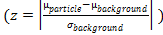 . The Intensity is defined as the average gray value measured on the channel used to detect the particle. Values may range between 0 and ‘max’.
Advanced: Press  to display advanced attributes. Press
  to reset attributes to default.
Septum: Particles with a number of septa outside the range specified in this field are rejected. Values may range between 0 and ‘max’. This attribute is enabled when septum detection is selected.
Poles: Particles with a number of poles outside the range specified in this field are rejected. Values may range between 0 and ‘max’.
X [um]: Particles with X coordinate outside the range specified in this field are rejected. Values are expressed in pixels or in calibrated units. Values may range between 0 and ‘max’.
Y [um]: Particles with Y coordinate outside the range specified in this field are rejected. Values are expressed in pixels or in calibrated units. Values may range between 0 and ‘max’.
Criteria: Particles that do not fit the specified criteria are rejected (see the Type section). Leave empty to turn this attribute off.
Area cut-off: Particles with an Area higher than the product of the specified maximal Area and the specified Area cutoff are rejected from Segmentation.
Count cut-off: The maximum number of particles that MicrobeJ will analyze on every position of the active image.
Contour color: Assign a contour color (Stroke color) to the particle.
Colors(s): Press  to open the Color dialog box.
Tracking: Press  to open the Tracking dialog box.
Clipboard: Press  to transfers Attributes to the Clipboard.
Test: Press  to test the current morphology settings on the active position. Scroll and press
  to test the current morphology settings on all positions of the selected Image.
Created with the Personal Edition of HelpNDoc: Free help authoring tool