Colors


This panel contains the specific colors associated with the different segments of the particle. Select  to hide the specified segment.
Contour: The color of the particle boundary.
Medial axis: The color of the medial axis of the particle.
Short axis: The color of the segment of the medial axis between the two poles of the particle.
Transverse axis: The color of the segment perpendicular to the medial axis passing through the center of the particle and bounded by the closest sides of the particle boundary.
Submedial axes: The color of the submedial axes of the particle (see Figure 1).
Straight axis: The color of the segment between the two ends of the medial axis. (see Figure 1).
Pole ½: The color of the poles of the particle.
Side ½: The color of the sides of the particle.
Septa: The color of the segment perpendicular to the medial axis passing through the point on the medial axis where the septa is detected and bounded by the closest sides of the particle.
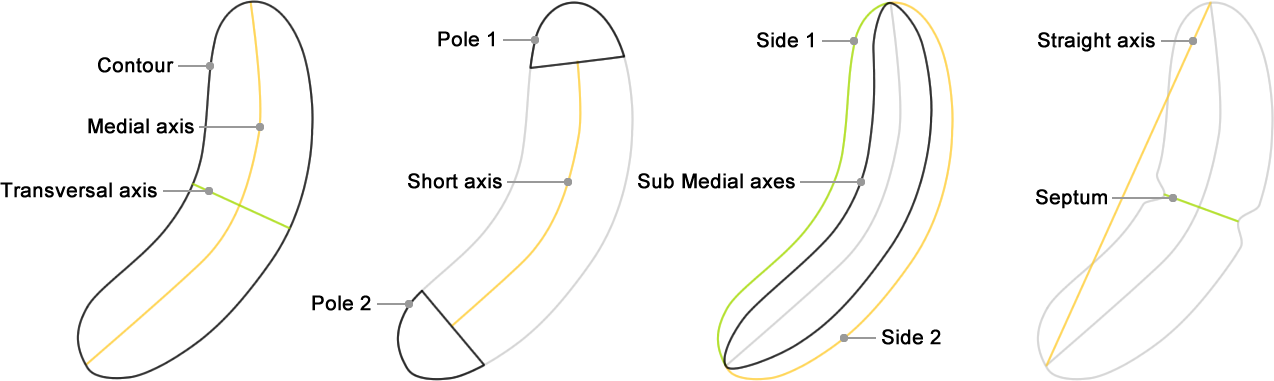
Figure 3: The different segments of a particle.
Linker: The color of the segment between the particle center and the reference point of the parent particle when an association is detected.
Raw Boundary: The color of the original contour of the particle when contour interpolation is enabled.
Bond: The color the segment between the particle center and any other particle center when a contact or a vicinity is detected (see Morphologies Options).
Rejected: The color of the particle boundary when rejected.
Label: Displays a list of properties values using the specified font size and the specified color.
Color: The color of the label.
f: Option to change font style and sizeThe font name, style and size of the label. The font size is expressed in pixels.
Label: The list of properties to be displayed next to the particle center. Note that annotations can be used among property names. The names of actual properties will be replaced by the corresponding values in the text. Use semicolon to display columnized and left-aligned properties at a time. The default setting is empty.
Label |
Output |
NAME |
b1 |
SHAPE.length |
12.41 |
length: SHAPE.length µm |
length: 12.41 µm |
NAME;SHAPE.length;SHAPE.width |
b1 12.41 2.12 |
name: NAME;width: SHAPE.width [SHAPE.width.min-SHAPE.width.max] |
name: b1 width: 2.12 [1.98-2.5] |
Created with the Personal Edition of HelpNDoc: News and information about help authoring tools and software