Association


Associations+: If checked, Maxima are linked hierarchically with the specified Particles (Bacteria or other Maxima). Associated Maxima are qualified as child particles and the specified particles as parent particles. The specific location, distances and localization of the child particles relative to their respective parents are measured and recorded in the Results table using the heading PARENT. The number of child particles is measured for each parent particle and recorded in the Results table using the heading MAXIMA.
Parent: Allow any of the active particles to be selected as parent particles. Default setting is ‘Bacteria’. Note that if you have more than one category of Maxima (i.e. Foci 1, Foci 2, etc…), their name will appear in this dropdown menu.
Non Associated: If checked, displays the result and the overlay of the non-associated Maxima. Default setting is unchecked.
Location: If checked, the location of child particles relative to their respective parent particles are measured and recorded in the Results table using the heading ‘PARENT.location’ (see Particle Properties for more details). Four relative coordinate systems are measured and recorded in the Results table: Cartesian, Orthogonal, Normalized and Cylindrical. (See Locations for more details).
Origin: Selects the point of origin inside the parent particle to compute the relative location of the child particle. Three points of origin are available: Center, Pole 1 and Pole 2. This command is enabled when the type of the selected parent particle is either ‘Bacteria’ or ‘Filament’. Default setting is ‘Center’.
Center: The center of the parent particle.
Pole ½: The tip of the pole 1 or 2. (See Orientation to see how to define pole 1 and 2).
Distances: If checked, the distances between the child particles and specific locations inside their parent particles are measured and recorded in the Results table using the heading ‘PARENT.distance’ (see Particle Properties for more details). Six distances are measured and recorded in the Results table: center, pole 1, pole 2, axis, side and linker (see Distances for more details). This command is enabled when the type of the selected parent particle is either a ‘Bacteria’ or ‘Filament’. Default setting is unchecked.
Inside +: If checked, Maxima spatially inside or within the boundaries of the specified Particles are associated.
Tolerance: The maximum distance in pixels or in calibrated units allowed between Maxima centers (or any point of the Maxima boundary, if ‘use boundary’ is selected. See Options) and the closest point of the parent particle boundaries when the Maxima is spatially outside the boundaries (see Figure 1).
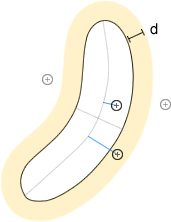
Figure 11: Distance within the parent boundary.
Distance: The maximum distance in pixels or in calibrated units between the Maxima center and a specific location inside the parent particle. Allows any of the different locations to be selected. Eleven locations are available: center, boundary, pole boundaries, pole centers, pole tips, pole1 boundary, pole2 boundary, pole1 center, pole2 center, pole1 tip and pole2 tip. Select ‘none’ to deactivate this option.
Center: The center of the parent particle.
Boundary: The closest point of the parent particle boundary.
Pole Boundaries: The closest point of the closest pole boundary.
Pole Centers: The center of the closest pole.
Pole Tips: The tip of the closest pole.
Pole ½ Boundary: The closest point of pole 1 or 2 boundary. (See Orientation to see how to define pole 1 and 2).
Pole ½ Centers: The center of the pole 1 or 2. (See Orientation to see how to define pole 1 and 2).
Pole ½ Tip: The tip of the pole 1 or 2. (See Orientation to see how to define pole 1 and 2).
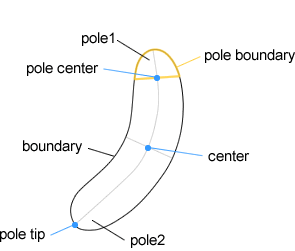
Figure 12: The points of reference inside the parent particle.
Z-score: Defines the z-score used to detect the contiguous areas surrounding local maxima inside the parent particle. (See Maxima detection for more details). The background signal is measured within the respective parent boundary. Set z-score to 0 to deactivate this option. Default setting is 0.
Boundary: If checked, uses any point of the maxima boundary instead of the Maxima center to determine whether the maxima is spatially inside or outside the detected boundary of the parent particle. Default setting is unchecked.
Exclusive: If checked, Maxima cannot be linked with more than one parent Particle.
Outside +: If checked, Maxima spatially outside the boundary of the specified Particles are associated.
Distance: The maximum distance in pixels or in calibrated units between the maxima center and a specific location in the parent particle. Allows any of the different locations to be selected. Seven locations are available: boundary, pole boundaries, pole tips, pole1 boundary, pole2 boundary, pole1 tip and pole2 tip.
Boundary: The closest point of the parent particle boundary.
Pole Boundaries: The closest point of the closest pole boundary.
Pole Tips: The tip of the closest pole.
Pole ½ Boundary: The closest point of pole 1 or 2 boundary. (See Orientation to see how to define pole 1 and 2).
Pole ½ Tip: The tip of the pole 1 or 2. (See Orientation to see how to define pole 1 and 2).
Angle: Maxima forming an angle with the closest or the selected pole axis outside the range specified in this field are not linked (see Figure 3). Angle is unsigned and is expressed in degrees. Values may range between 0 and ‘180’. This command is enabled when ‘Pole tips’, ‘Pole tip 1’ or ‘Pole tip2’ are selected.
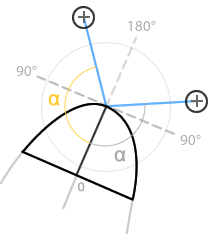
Figure 13 : The outside association angle.
Bezier linker: If checked, the linker between the Maxima centers and the points of reference in the parent particle are defined using a parametric curve (Bezier curve). Default setting is unchecked.
Exclusive: If checked, Maxima cannot be linked with more than one parent Particle. Default setting is unchecked.
Overlap: If checked, the segment between the Maxima center and the reference point of the parent particle (cf. Linker) can overlap boundaries of other surrounding particles. If not checked, Maxima with a linker overlapping at least one other particle boundary are not linked. Default setting is checked.
Cutoff +: If checked, keep only the specified number of association per parent particle or per specific region of the parent particle. When the number of association exceed the specified number, keeps only the associations with the closest distance between the point of reference and the Maxima center or the lowest value of the property when specified.
Count: Sets the maximum number of association per parent particle or per specific region of the parent particle. Allows any of the different cutoff method to be selected. Three methods are available: per Particle, per Pole and per Side. Default setting is ‘per Particle’.
Property: Selects the property to be used. Leave the field blank to select the default property (cf. distance between the Maxima center and the point of reference of the parent particle).
Localization +: If checked, the specific localization of each Maxima inside their respective parent particle are measured and recorded in the Results table (see Particle Properties for more details). Two types of localization are determined: polar and midcell. The child particle that are neither polar nor midcell are determined as ‘betwixt’. The localization can be automatically or manually determined. Sets ‘auto’ to use the automatic mode.
Polar: If ‘auto’, Maxima located within the region of the particle extending from the tip of the pole to a position on the medial axis located half the width away from the tip of the pole, are considered as polarly localized. If a range is specified, Maxima with an absolute relative position between the range specified in this field are considered as Polarly localized. Default setting is ‘auto’.
Mid-cell: If ‘auto’, Maxima located within the region of the particle extending from the particle center to a position on the medial axis located half the width away from the particle center, are considered as mid-cell localized. If a range is specified, Maxima with an absolute relative position between the range specified in this field are considered as mid-cell localized. Default setting is ‘auto’.

Figure 14 : Polar/midcell Localization
Created with the Personal Edition of HelpNDoc: Single source CHM, PDF, DOC and HTML Help creation