Tracking


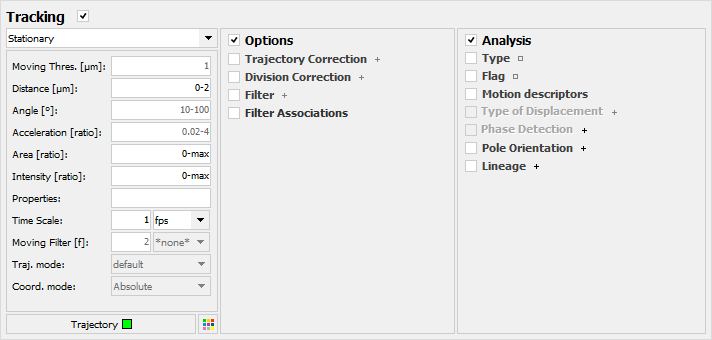
If checked, particles are tracked using an optimized nearest-neighbor algorithm. For each particle at a specific frame, the algorithm searches for particles on the next frame matching the specified conditions (distance, angle, acceleration, area, intensity). For each retained pair of particles, the algorithm computes a correlation score using the root mean squared of the specified ratios (distance, angle, acceleration, area, intensity). The algorithm then determines the most probable pairs by selecting the ones maximizing the correlation score.See the Options panel and the Analysis panel for more details.
Mode: Allows any of the different modes of tracking to be selected. Two modes of detection are available: Stationary and Mobile.
Stationary: Tracks the particles assuming that they are not actively moving. Only the distance, area and intensity will be measured and used to compute the correlation score.
Mobile: Tracks the particles assuming that they are either not or actively moving. A particle is considered as moving when the average distance traveled by the particle in the previous frames is greater than the specified threshold value (see Moving Threshold below). The distance, area and intensity will be measured and used to compute the correlation score. When particles are considered as actively moving, the angle and acceleration will also be measured and used to calculate the correlation score.
Moving Threshold: The minimum distance between particles on two consecutive frames for a particle to be considered as moving. Values are expressed in pixels or in calibrated units. Values may range between 0 and ‘max’.
Distance: Particles on the next frame at a distance from a particle on the current frame outside the specified range are rejected by the tracking algorithm (Figure 1). Values are expressed in pixels or in calibrated units. Values may range between 0 and ‘max’.
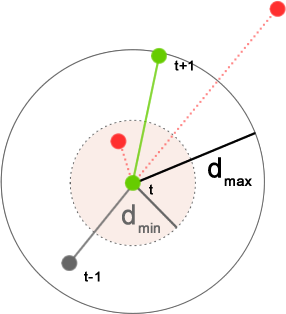
Figure 20: The tracking distance parameter.
Angle: Particles on the next frame forming an angle with a particle on the current frame and a particle on the previous frame, inside the specified range are rejected by the tracking algorithm (Figure 2). Values are expressed in degree. Values may range between 0 and ‘180’.
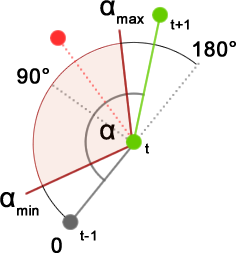
Figure 21: The tracking angle parameter.
Acceleration: Particles on the next frame with an acceleration ratio outside the specified range are rejected by the tracking algorithm. The acceleration ratio is the ratio of the distance between the particles on the next frame and the current particle (dt+1) and the last distance traveled by the current particle (dt) (Figure 3).
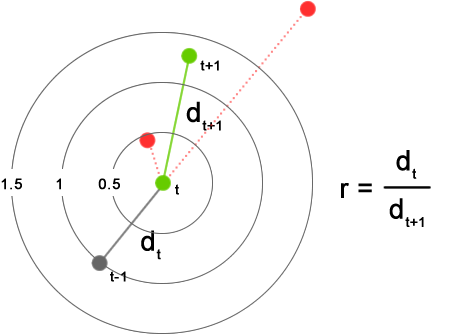
Figure 22: The tracking acceleration parameter.
Area: Particles on the next frame with an area ratio outside the specified range are rejected by the tracking algorithm. The area ratio is the ratio between the area of the particles on the next frame (at+1) and the area of the current particle (at) (Figure 4).
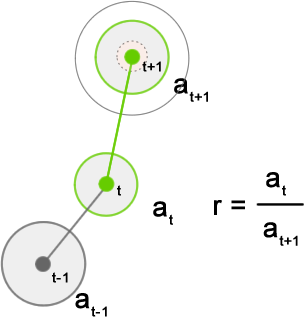
Figure 23: The tracking area parameter.
Intensity: Particles on the next frame with a signal intensity ratio outside the specified range are rejected by the tracking algorithm. The intensity ratio is the ratio between the fluorescence intensity of the particles on the next frame (It+1) and the area of the current particle (It).
Properties: Particles on the next frame with the specified property ratio outside the specified range are rejected by the tracking algorithm. The property ratio is the ratio between the value of the specified property of the particles on the next frame (vt+1) and the value of the specified property of the current particle (vt). Note that any properties can be used in this field (for example: SHAPE.length or MAXIMA). Default value is empty.
Time Scale: Defines the time interval between 2 consecutive frames using the specified unit (fps, s/frame, min/frame, h/frame).
Moving Filter: Allows any of the 8 moving filters to be selected. When selected, the calculated distances and velocities are smoothed using the specified moving filter of the specified size. Default setting is ‘none’.
Trajectory mode: Allows any of the 3 trajectory modes to be selected. Two trajectory modes are available: default, Linear and Bezier. Default setting is ‘default’.
Coordinate mode: Allows any of the 3 modes of coordinate to be selected. Note that this option is available only when particles are associated. Default setting is ‘Absolute’.
Absolute: If selected, particles are tracked using their absolute coordinates.
Relative: If selected, particles are tracked using their relative coordinates (see Association for more details).
Cylindrical: If selected, particles are tracked using their polar/cylindrical coordinates (see Association for more details).
Trajectory color: Assign a color to the trajectory of tracked particles.
Colors(s): Press  to open the Color dialog box.
Created with the Personal Edition of HelpNDoc: Create HTML Help, DOC, PDF and print manuals from 1 single source