Septum


Two modes of septum detection are available: Intensity and/or Width profile.
Intensity: If checked, septa are detected using the intensity profile of pixels along the medial axis of the particle. Septa are located along the intensity profile using a local maxima algorithm. Local maxima located at the edges of the medial axis are excluded. For each septa, the ratio of the given intensity to the median value measured along the intensity profile is calculated. Ratio values may range between 0 and ‘max’. Note that the higher the value, the more significant septa are. Default setting is unchecked.
Channel: Allows any of the four different channels (1-4) of the active image to be selected.
Type: Selects the type of septa. Select “Dark”, if the septum is darker than the particle. Select “Bright”, if the septum is brighter than the particle (phase contrast or fluorescent septa).
Threshold: Septa with a ratio lower than the smallest value specified in this field are ignored. Septa with a ratio higher than the largest value specified in this field can be used for segmentation (see Segmentation below).
Resolution: Selects the resolution in pixels of the medial axis used to determine the Profile. Note that when the thickness is equal to 0, the the profile will be calculated using the medial axis default resolution.
Line width: Selects the thickness in pixels of the line used to measure pixels intensities. Note that when the thickness is bigger than one, the profile will be calculated over the thickness using the specified method. Default setting is 1.
Line method: Selects the method used to calculate the profile along the specified axis and over the specified thickness. The default method is the maximum intensity projection. The Q1 and Q3 methods are respectively the first and the third quartile intensity projection. Default setting is ‘mean’.
Width: If checked, septa are detected using the width profile measured along the medial axis of the particle. Septa are located along the width profile using a local maxima algorithm. Local maxima located at both ends of the medial axis are excluded. For each septa, the ratio of the given width to the median value measured along the width profile is calculated. Ratio values may range between 0 and ‘max’. Note that the higher the value, the more significant septa are.
Threshold: Septa with a ratio lower than the smallest value specified in this field are ignored. Septa with a ratio higher than the largest value specified in this field can be used for segmentation (see Segmentation below).
Resolution: Selects the resolution in pixels of the medial axis used to determine the Profile. Note that when the thickness is equal to 0, the the profile will be calculated using the medial axis default resolution.
Segmentation: If checked, particles with rejected septa are segmented based on their location and their orientation.
Width: Selects the width in pixels of the line used to segment particles. Default setting is 0.5.
Parent Axis: If checked, keeps the medial axis of the initial particle to generate the medial axis of the segmented particles (see Figure 1). Default setting is checked.
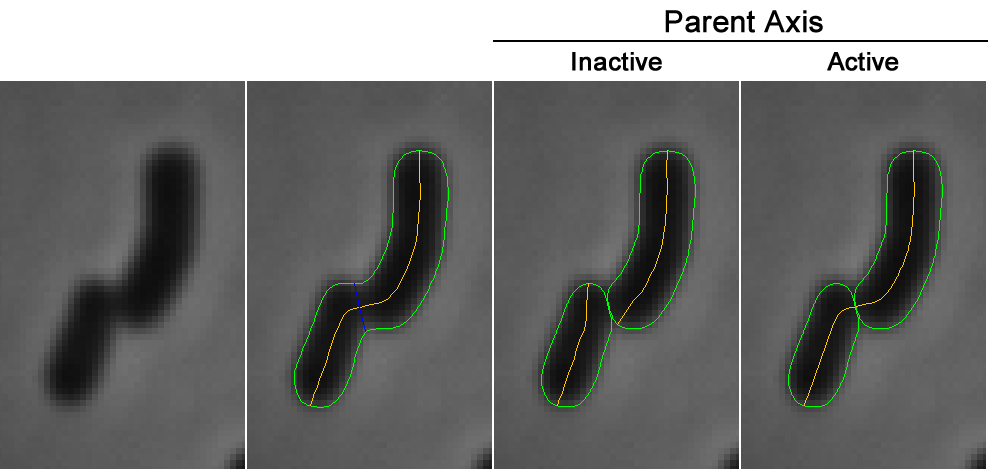
Figure 7: The different modes of septum segmentation.
Created with the Personal Edition of HelpNDoc: Free PDF documentation generator